
Create user access token & authorization header
Create user access token & authorization header
ToThis authenticationarticle againstexplains thehow to authenticate to Microsoft Graph API there are two general concepts. Application permissions allow an application in Microsoft Entra ID to act as it's own entity, rather than on behalf of a specific user. Delegated permissions allow an application in Microsoft Entra ID to perform actions on behalf of a particular user.
This guide focuses on authentication as adelegated user to create scripts in the context of the provided user. To create or renew a token in the application context there are other instructions.context.
Use case
ThisImportantauthenticationAvoidisResourcerequiredOwnerifPasswordyou want to retrieve, update, or create resources using the Microsoft APIsCredentials (AzureROPC)ManagementwheneverAPI,possible.Microsoft Graph API). This is for delegated-based permissions such as user triggered scripts or automations.
Graph API authentication
To authenticate with application permission you have to use an Microsoft Entra ID App Registration. There you can specify an Client Secret as it is described here:Get app details and gr... | LNC Docs (lucanoahcaprez.ch)
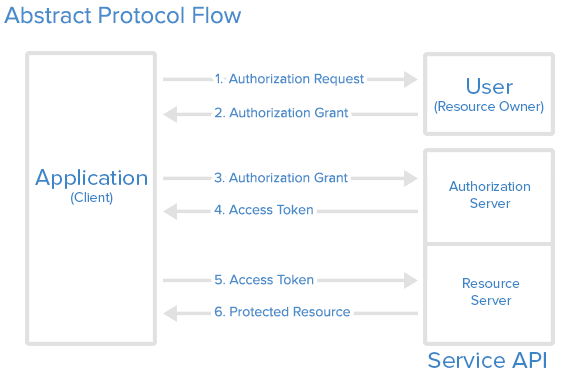
The authentication method used for Microsoft Graph API is the industry-standard OAuth 2.0. This concept uses access tokens for authenticating against API endpoints. These access tokens are then sent to the resource server in the HTTP header. Therefore we have to create the header correctly to use the resources of the Microsoft Graph API.
Get access token from Graph Explorer
The simplest variant can be used for one-off tokens or scripts that are rarely executed by the user.The code can simply be copied out under “Access token” in Microsoft Graph Explorer.It isalsoincompatibleimportantwiththatmany“Bearer”MFA,isConditionaladdedAccess,atpasswordless,theandfrontpasskey-based(sign-inthescenarios.
Recommended options
Preferred approaches for delegated Graph access:
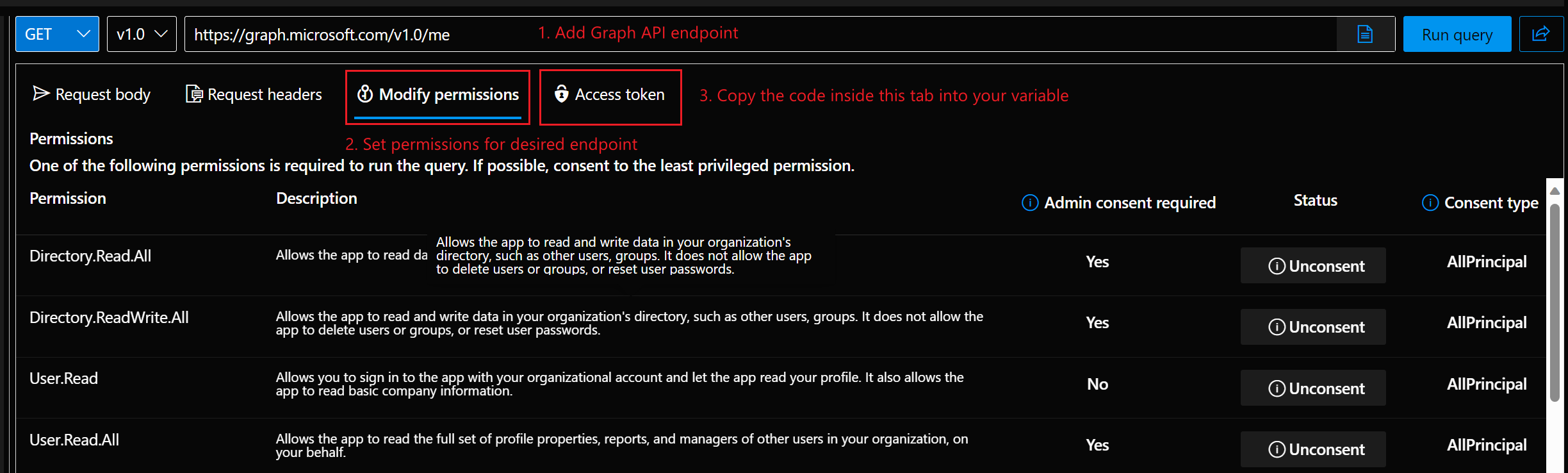
If the permission were recently granted, refresh the page a few times or be a bit more patient ;)
Build header via PowerShell script
The following scripts creates the header that contains the header property and the corresponding Bearer token. This function needs the arguments tenant ID, client (Application) ID, the client secret, the username and the password. This function has to be called the first time
Example with these parameters.
Attention: This function returns a complete header. If you want to specify more information in the request header you have to use the function lower on this page.
#Install-Module FunctionMSAL.PS for-Scope getting Microsoft Entra ID Authentication Header
function Build-MicrosoftEntraIDUserAuthenticationHeader {
    param (
        [Parameter(Mandatory=$true)]
        [string]CurrentUser

$TenantId,
        [string] $ClientId,
        [string] $ClientSecret,
        [string] $Username,
        [string] $Password,
        $Refreshtoken
    )

    $authenticationurl = "https://login.microsoftonline.com/$tenantid/oauth2/v2.0/token"

    if($refreshtoken -and $tenantId){
        $tokenBodySource = @{
            grant_type = "refresh_token"
            scope = "https://graph.microsoft.com/.default"
            refresh_token  = $refreshtoken
        }
    }
    elseif($tenantId -and $clientid -and $clientSecret){
        $tokenBodySource = @{
            client_id = $clientId
            scope = 'https://graph.microsoft.com/.default'
            grant_type = 'password'
            username = $username
            password = $password
            client_secret = $clientSecret
        }
    }
    else{
        Write-Error "Authorization not successful. Not enough information provided."
    }

    while ([string]::IsNullOrEmpty($AuthResponse.access_token)) {
        $AuthResponse = try {
            Invoke-RestMethod -Method POST -Uri $authenticationurl -Body $tokenBodySource
        }
        catch {
            $ErrorAuthResponse = $_.ErrorDetails.Message | ConvertFrom-Json
            if ($ErrorAuthResponse.error -ne "authorization_pending") {
                Write-Error "Authorization not successful. Error while posting body source: $($ErrorAuthResponse.error)"
                throw
            }
        }
    }

    if($AuthResponse.token_type -and $AuthResponse.access_token){
        $global:MicrosoftEntraIDAccessToken = "$($AuthResponse.token_type) $($AuthResponse.access_token)"
        $global:MicrosoftEntraIDHeader = @{
            "Authorization" = "$global:MicrosoftEntraIDAccessToken"
        }
        Write-Output "Authorization successful! Token saved in variable."
    }
    else{
        Write-Error "Authorization not successful. Not enough information provided."
    }
}

# Authorization Header with ClientId, ClientSecret and User Credentials
$tenantId="<tenantid>"
$ClientId="<appregistrationclientapp>"
$ClientSecret="<appregistrationclientsecret>"
$UsernameTenantId = "<yourusernametenant-id>"
$PasswordClientId = '"<yourpasswordapp-client-id>'"
Build-MicrosoftEntraIDUserAuthenticationHeader$Scopes   = @("User.Read", "Mail.Read")

$Token = Get-MsalToken -TenantId $TenantId -ClientId $ClientId -TenantIdScopes $tenantId -ClientSecretScopes

$ClientSecret -Username $Username -Password $Password

# Authorization Header with refresh_token
$tenantId="<tenantid>"
$refreshtoken="<yourrefreshtoken>"
Build-MicrosoftEntraIDUserAuthenticationHeader -TenantId $tenantId -refreshtoken $refreshtoken
Get Bearer Token via PowerShell script
This function allows you to use more than one header property. It only returns the access token which then has to be built into a header by itself. But the other functionalities and parameters work like the function above.
# Function for getting Microsoft Entra ID Access Token
function Build-MicrosoftEntraIDUserAccessHeader {
    param (
        [Parameter(Mandatory=$true)]
        [string] $TenantId,
        [string] $ClientId,
        [string] $ClientSecret,
        [string] $Username,
        [string] $Password,
        $Refreshtoken
    )

    $authenticationurl = "https://login.microsoftonline.com/$tenantid/oauth2/v2.0/token"

    if($refreshtoken -and $tenantId){
        $tokenBodySource = @{
    grant_typeAuthorization = "refresh_token"Bearer scope$($Token.AccessToken)"
    "Content-Type" = "https://graph.microsoft.com/.default"
            refresh_token  = $refreshtokenapplication/json"
}
}Best -andpractices
Summary
For -Passwordmodern $PasswordMicrosoft #Graph Authorizationdelegated Headeraccess, withuse refresh_tokenMSAL $tenantId="<tenantid>"plus $refreshtoken="<yourrefreshtoken>"interactive Build-MicrosoftEntraIDUserAuthenticationHeaderor -TenantIddevice-based $tenantIdsign-in -refreshtokenmethods. $refreshtokenAvoid