
Microsoft Entra ID SSO for Mealie
Microsoft Entra ID SSO for Mealie
This guide shows how to configure Mealie with Microsoft Entra ID using OpenID Connect (OIDC).
Important design note
If you use a Prerequisites:client secretAbility, register the application as a Web / confidential client. Do not document it as a Single Page Application when the backend is using a client secret.
Why use OIDC with Mealie
Benefits:
Prerequisites
Mealie makes recipe management and planning extremely easy. The Mealie software offers an OpenID interface, which means thatin Microsoft Entra ID
Step be1: used as an identity provider and permission manager.
Create App Registration
First, anthe app registration
including
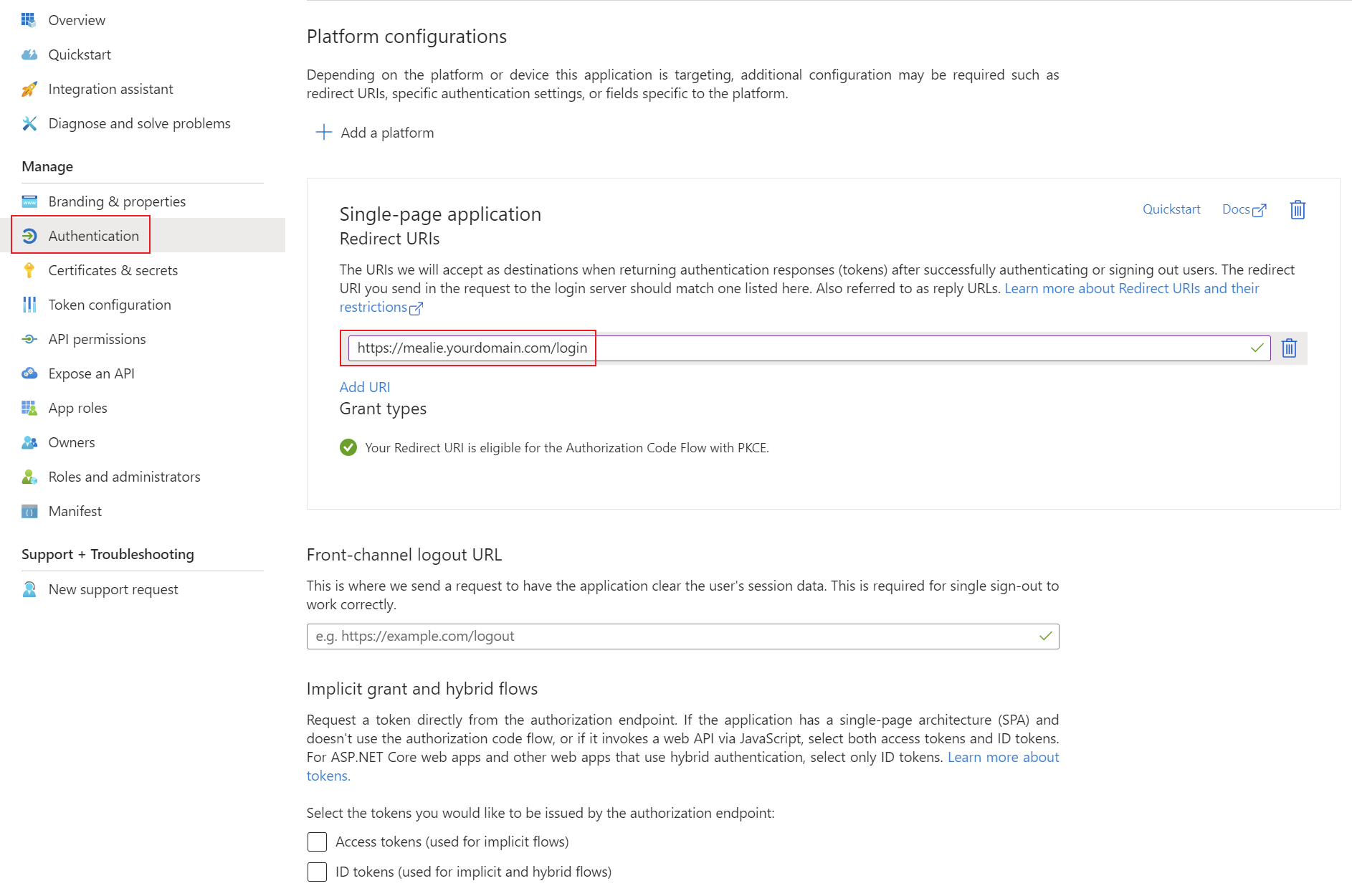
Recommended client secret must be created in Microsoft Entra ID. All settings can be left at the default values. Important settings are the Redirect URIs under the Authentication tab. Set these URIs to your external or internal domain on which Mealie is available. These URIs will be used for Microsoft Entra ID to know where to redirect the user in case of successful logins.settings:
Type:Platform:Single-page application
Web- Redirect
URIs:URI:https://mealie.yourdomain.com/login
use the callback URL expected by your Mealie version and reverse proxy design
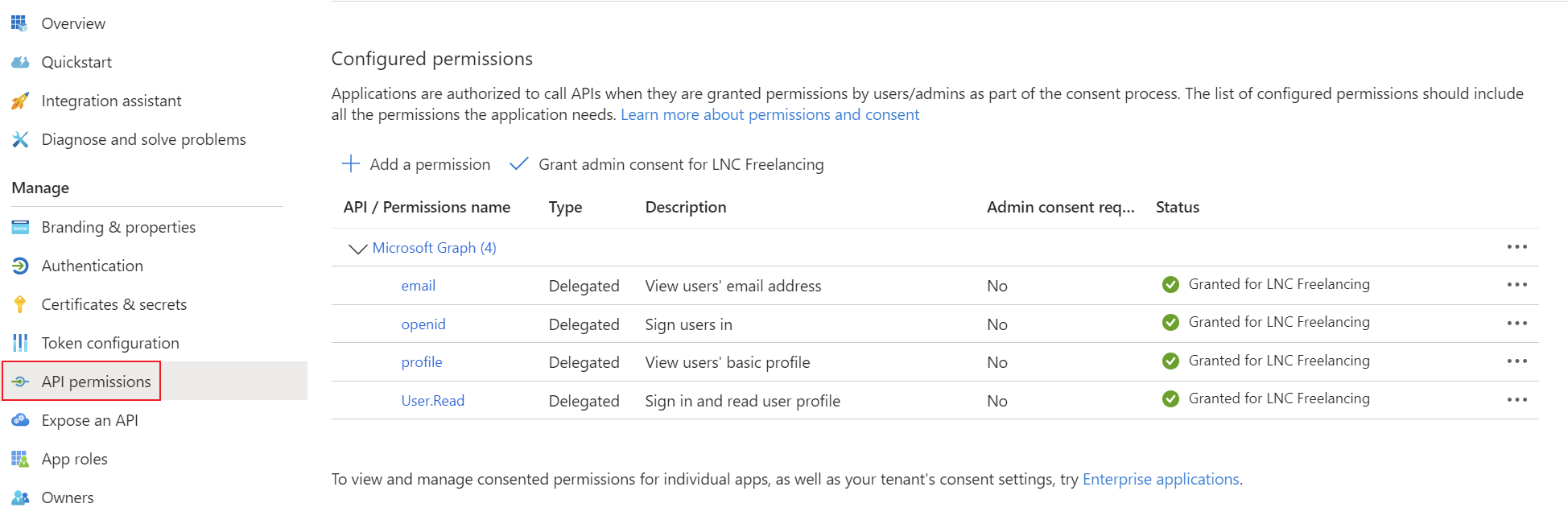
AddRecord the corresponding permissions for OpenID Connect as delegated permissions and grant admin consent for your tenant.
Create a client secret for the application and save the tenantTenant ID, applicationClient ID and clientClient secretSecret.
Step 2: Configure OIDC in your password manager. You can find instructions for this information here: Get app details and grant permissions to app registration
Setup Microsoft Entra ID login provider
With Mealie, the Microsoft Entra ID configurations can be set up using environment variables. Installation using Docker is mandatory for these instructions. The following environment variables enable the configuration of the OpenID integration. You can find more information on all of Mealie's environment variables here: Backend Configuration - Mealie
The relevant environment variables for OpenID are as follows:
Side note: As this type of configuration involves environment variables, these contents can also be transferred via the volume as an .env file, specified with a simple startup command or specified in another declarative context (Kubernetes manifest, Terraform, etc.).
Docker compose example
This Docker Compose file shows a possible configuration for Mealie that authenticates using Microsoft Entra ID. In addition, a mail server is also specified for outgoing SMTP mail traffic.
Customize this content with your specifications and save the content in a normal docker-compose.yaml file. As this is Docker Compose, the application can be started easily with the following command (in detach mode -> -d):
docker compose up -dversion: "3.7"
services:
mealie:
image: ghcr.io/mealie-recipes/mealie:latest
container_name: <yourcontainername>
ports:
- "8600:<yourpublicport>"
volumes:
- <yourpersistentpath>:/app/data/
environment:
- ALLOW_SIGNUP=true
- OIDC_AUTH_ENABLED=true
- OIDC_SIGNUP_ENABLED=true
-
OIDC_CONFIGURATION_URL=https://login.microsoftonline.com/<yourtenantidtenant-id>/v2.0/.well-known/openid-configuration
- OIDC_CLIENT_ID=<yourclientidclient-id>
-
OIDC_CLIENT_SECRET=<yourclientsecretclient-secret>
-
OIDC_PROVIDER_NAME=Microsoft Entra ID
-OIDC_USER_CLAIM=email
PUID=1000OIDC_NAME_CLAIM=name
-OIDC_GROUPS_CLAIM=groups
PGID=1000
- TZ=<yourtimezone>
- MAX_WORKERS=1
- WEB_CONCURRENCY=1
- BASE_URL=https://<yourmealiedomain>
- SMTP_HOST=<yoursmtpmailhost>
- SMTP_PORT=587
- SMTP_FROM_EMAIL=<yoursmtpmail>
- SMTP_USER=<yoursmtpmailuser>
- SMTP_PASSWORD=<yoursmtpmailpassword>
- SMTP_FROM_NAME=<yourmailname>
restart: unless-stoppedOptional:
OIDC_USER_GROUP to allow only one specific group
OIDC_ADMIN_GROUP to make selected users admins
ALLOW_PASSWORD_LOGIN=false only after testing
Best practices
Summary
For Mealie, Microsoft Entra ID integration should be documented as a standard OIDC confidential client pattern when a client secret is used.