
Expose docker host API to connect over TCP
This page describes exposing the Docker Host API over plain TCP without proper security controls. Directly binding the Docker daemon to an unprotected TCP socket (e.g. 0.0.0.0:2375) is strongly discouraged because it can allow unauthorized remote users to gain full control of your Docker host. Modern Docker best practices require securing remote API access with TLS or using alternatives such as SSH, VPN or a proxy solution. For current guidance, refer to the official Docker documentation on configuring remote access and securing the Docker daemon.
Edit file on docker host
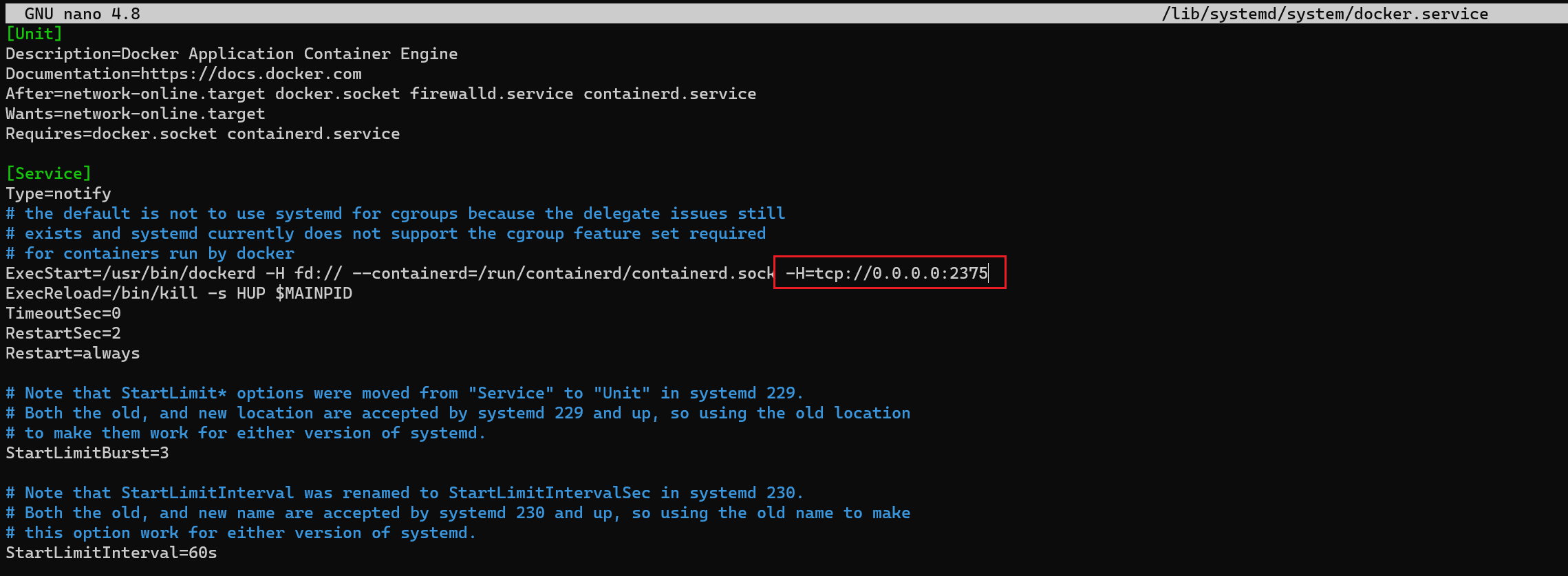
Edit this file /lib/systemd/system/docker.service with root permissions and add the string of " -H=tcp://0.0.0.0:2375" behind the "ExecStart=" row.
sudo nano /lib/systemd/system/docker.serviceAdd text to configuration file
Reload docker deamon
sudo systemctl daemon-reloadRestart docker service
sudo systemctl restart docker